
Learning Android: WebView character encoding
In my continued attempts to learn how to write an Android application I came across a problem with character encoding when trying to load some text into a WebView.
I was initially trying to write the text to the WebView like this:
WebView webview = new WebView(collection.getContext());
webview.loadData(textWithQuotesIn, "text/html", "UTF-8");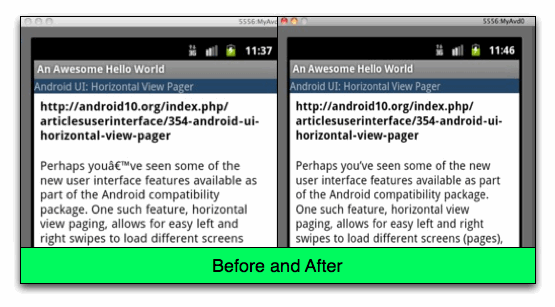
But ended up with the output in the picture on the left hand side. I tried playing around with the encoding and debugged the application all the way through until it hit the WebView but there didn’t seem to be any problem with the text.
I eventually came across a post on StackOverflow where mice suggested using one of the other methods available for writing to a WebView.
I changed my code to read like this:
WebView webview = new WebView(collection.getContext());
webview.loadDataWithBaseURL(url, textWithQuotesIn, "text/html", "UTF-8", url);
And now the single quotes are rendering correctly as can be seen on the image on the right.
I had a quick look at the Android source code to see if there was any obvious reason why one of the methods would work and the other wouldn’t but I couldn’t see anything.
Perhaps I’m doing something wrong with my call to 'loadData' and that’s why it’s not rendering the character set correctly. If that’s the case please let me know.
About the author
I'm currently working on short form content at ClickHouse. I publish short 5 minute videos showing how to solve data problems on YouTube @LearnDataWithMark. I previously worked on graph analytics at Neo4j, where I also co-authored the O'Reilly Graph Algorithms Book with Amy Hodler.